Six Months of Faxify MCP: What We Learned Shipping AI-Powered Fax
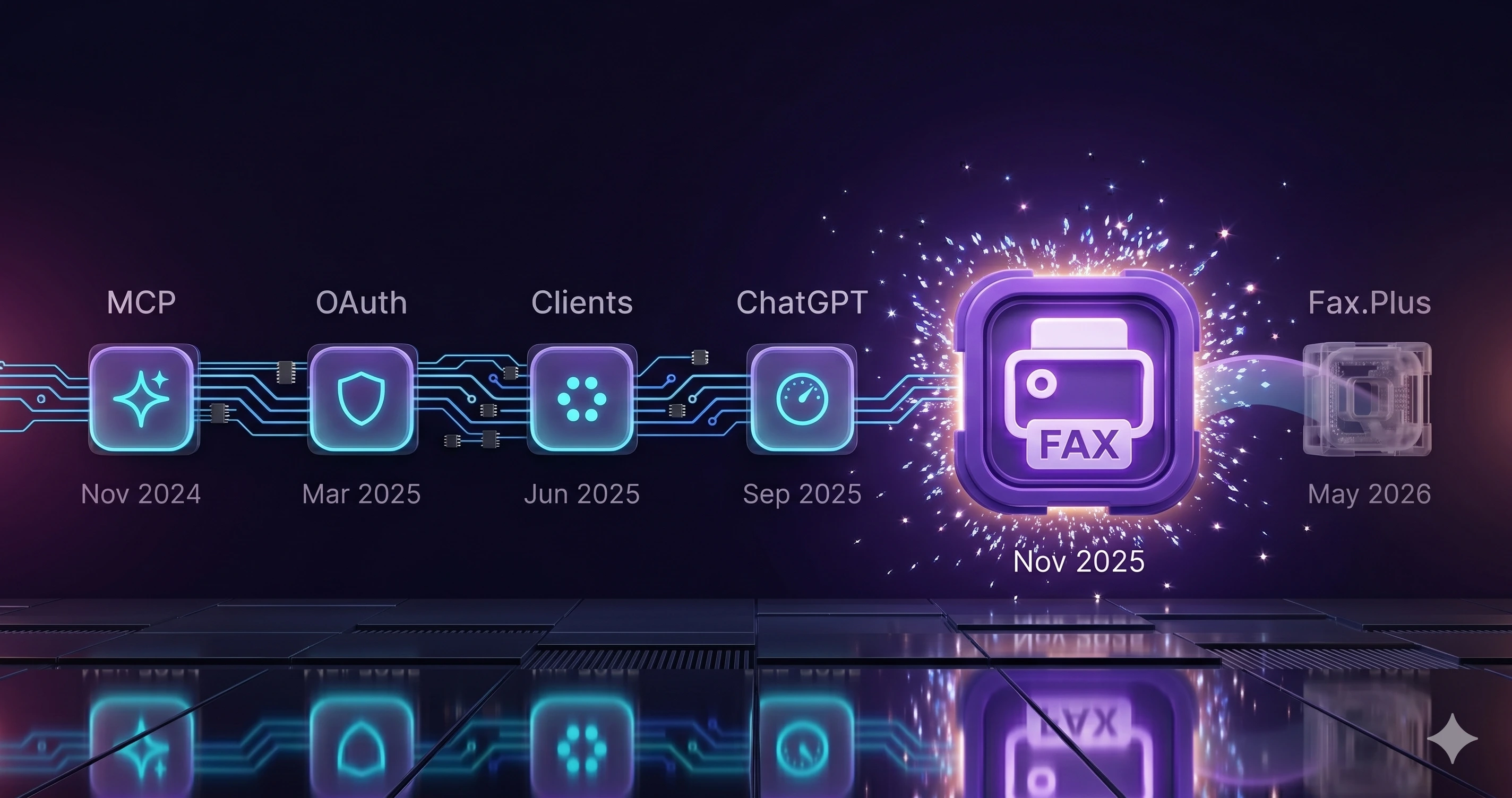
When we shipped Faxify MCP on November 9, 2025, the protocol layer was already mature. MCP was a year old. OAuth 2.1 had been part of the MCP authorization spec since March 2025, refined again in June, and refined a third time the same week we shipped. Claude.ai web had supported remote OAuth-MCP integrations for six months by then. Enterprise since May, Pro since June. Cursor 1.0 had landed in June with native MCP plus OAuth plus one-click setup. ChatGPT Developer Mode with full MCP support had shipped two months before us, on September 9, covering Pro, Plus, Business, Enterprise, and Education plans. The ecosystem was ready. What was missing was domain depth: we hadn't found a commercial fax service that had built fax as a typed MCP surface.
Faxify wasn't early to the protocol. Faxify brought fax into an already-mature AI-client MCP ecosystem; we haven't found an earlier hosted fax MCP server. Six months later, one other major fax service had announced an MCP server, gated to enterprise plans.
This is a retrospective on what we built, what we'd build the same way today, and the architectural decisions that turned out to matter more than any of the others.
For the canonical setup guide, see the AI-Powered Faxing guide to Faxify MCP. This post is the reflection, not the manual.
TL;DR
- Hosted won. Self-deploy would have been a tax users wouldn't have paid.
- Unified identity across the app and the MCP surface is the decision that compounded. One sign-in across iOS, Android, web, and every MCP client.
- OAuth 2.1 for HTTP clients, JWT-bridged stdio for everyone else, both against the same endpoint.
- 18 typed tools. The draft → preview → send pattern matters more than the count.
- MCP on every tier, including the free 5-pages/month plan. Fax.Plus, the other fax-SaaS MCP, went the other way and gates it to paid plans.
- Shipped November 9, 2025, as a hosted commercial fax MCP server, into an already-mature protocol ecosystem. We haven't found an earlier one.
The architectural decisions that aged well
Six months in, the architecture has held. The pieces we built carry the load we expected, and the parts of the MCP spec that churned around us, notably authorization, are the ones we kept loose enough to adapt.
Hosted, not self-deployed
The first decision was whether to ship a hosted server or an open-source one users would run themselves. Open-source-and-self-host is the default shape in the early MCP ecosystem: the popular reference servers (filesystem, GitHub, Postgres) are local processes you clone and run. We went hosted.
A hosted server at https://mcp.faxify.com/api/v1/mcp keeps the MCP spec implementation current and runs the OAuth, JWT, and storage plumbing. A user pointing Claude Desktop or Cursor at a URL is doing roughly nothing.
The stdio bridge is open source: Faxify/mcp-client on GitHub. That's the piece that benefits from being inspectable on the user's machine. The hosted server stays hosted.
Two auth paths, one endpoint
The second decision was authentication. By November 2025, OAuth-MCP was already live across the major clients. The question wasn't whether to wait for OAuth. The question was whether to build a separate MCP auth surface, or to extend our existing app auth (Apple SSO, Google SSO, email OTP, JWT) to be MCP-aware.
We extended. Both paths route to the same MCP endpoint.
For HTTP-native clients (Claude.ai web, ChatGPT Developer Mode), the server implements OAuth 2.1 with Dynamic Client Registration per RFC 7591. Clients discover our authorization endpoints via the well-known metadata at /.well-known/oauth-authorization-server per RFC 8414, self-register without a whitelist, and complete the standard authorization-code flow. Authorization codes are stateless JWTs encrypted with AES-256-GCM. No client secrets to leak. No redirect URI whitelists to maintain.
For stdio-based clients (Cursor, Claude Desktop, Continue.dev, Cline), users copy a JWT from Settings at mcp.faxify.com into the client's MCP config. The @faxify/mcp-client npm wrapper bridges stdio to HTTPS, sending the JWT as the bearer token on every request.
The bet was that the stdio-vs-OAuth divide would persist longer than a single quarter. It has. The MCP authorization spec went through revisions; the basic shape of "OAuth for HTTP clients, JWT for stdio clients" did not.
Same account, same auth, same subscription
The decision that compounded: don't build "MCP users" as a separate user table. Faxify already had Apple SSO, Google SSO, and email OTP wired up for the iOS, Android, and web apps. MCP extends those same flows. It doesn't introduce parallel ones.
For stdio clients, the JWT a user copies from their Faxify account settings is the same JWT that authenticates their app session. One issuance. Valid everywhere the user has a Faxify-aware client.
The path most fax services have taken is to build a separate API key or MCP key surface, sometimes with its own subscription line, sometimes with its own billing meter. We didn't. The cost of unified identity across the app and the MCP surface was real, but it was paid down once.
The result: a user who signed in with Apple on iOS at 9am can paste the server URL into Claude.ai at noon and start drafting faxes from their existing 5-page allowance, with no new account or support email to remember.
18 tools, typed end-to-end
The move that mattered most for agent quality was tool surface area. Faxify MCP exposes 18 typed tools across four categories: drafts (six tools), send and upload (four), inbox and status (four), and account and plans (four). Every tool declares input schema, success response shape, and error response shape in the MCP type system, so AI clients get autocomplete-quality argument suggestions and validate inputs before calling. The number 18 isn't sacred: it's the surface area that emerged from one principle: every operation a thoughtful AI agent would want to do on behalf of a user has its own tool, with shapes that make destructive operations explicit.
The draft tools (create_draft, get_draft, update_draft, delete_draft, list_drafts, get_draft_preview) carry more weight than they look. An agent that drafts a fax, previews it, and waits for the user's confirmation before calling send_fax_using_draft is the difference between "useful assistant" and "loose cannon dialing fax numbers." We added the preview tool early. We'd add it earlier next time.
What we didn't add: any tool that spends money or deletes the account on a bad prompt. Those force the user back into the app on purpose.
What 6 months of real-world MCP fax actually looks like
We were earlier than the demand. We knew that going in. The shape of what arrived matched some of our predictions and contradicted others.
Which clients showed up first
Developer audiences moved fastest because the MCP config file was already in their muscle memory by November. Cursor and Claude Desktop were the first integrations users wired up. Claude.ai web users on Enterprise and Pro tiers wired Faxify up the same day we launched; the OAuth flow there is by some distance the cleanest of any path. ChatGPT Developer Mode worked on the first try without us shipping anything. That's what protocols are for (the one gap: ChatGPT Free still doesn't have a native MCP path, because Developer Mode isn't available on that tier).
The other stdio clients (Continue.dev, Cline) needed no per-client work. One wrapper, one JWT, one JSON snippet copied between configs.
Authentication spec churn during the launch window
The MCP authorization spec was a moving target around our launch. It was revised in June 2025 and again in November 2025. The November revision arrived the same week we shipped. We had to absorb those changes without breaking the launched product.
This is where the hosted architecture earned its place. Spec changes landed server-side and went out with the next deploy of mcp.faxify.com. Stdio users with @faxify/mcp-client installed locally didn't have to update anything; the wrapper's surface to the user (copy a JWT, paste it into a config file) stayed stable while the wire protocol underneath it changed. A user running an open-source MCP fax server themselves would have had to track the spec, redeploy on each revision, and debug their own auth flow against a moving authorization document.
The access-tier decision
We decided in November 2025 that MCP should be on every Faxify plan, including the free 5-pages/month tier. Six months later, Fax.Plus, the only other major fax SaaS with an MCP server at the time, went the opposite direction.
MCP isn't a premium feature. It's a connection method. Treating it as a paid upsell is the same category mistake that would have been made charging extra for SSL in 2010, or for API access in 2015. Both got priced into the base product over time because they were table stakes. AI integration is on the same trajectory, just faster.
The analogue is clear. In the mid-2010s, "API access" was a premium tier: Slack, GitHub, Salesforce all gated APIs to higher plans. By 2018, most had moved APIs to the base tier; differentiation moved to rate limits and scope. The premium tier wasn't "having an API," it was "having more API." The differentiation in 2026 isn't whether you ship an MCP server. It's how much MCP-driven usage your plan includes.
Our free tier gets 5 pages a month and access to every Faxify tool, including all 18 MCP tools. A user can wire up Claude Desktop, send a half-dozen real test faxes, and decide whether the integration earns its keep before putting a card down. That's the right shape for a developer or operator evaluating fax automation. Asking them to commit to an enterprise contract before they've seen the API work isn't a sales motion; it's a filter that screens out the audience that should be your earliest fans.
Faxify is not HIPAA compliant and does not sign Business Associate Agreements. Do not send PHI through Faxify. This applies to every plan, free and paid, and to the MCP server. But for everything else (small-firm legal filings, real-estate disclosures, recruitment paperwork, invoice acknowledgments, the long tail of regulated communication that doesn't involve PHI), the right shape is "make MCP cheap to try, then scale with usage." MCP usage decrements the same page allowance as the apps.
Where the rest of the field is, as of May 2026
Six months after we shipped, the public map of MCP across commercial fax providers is short.
- Fax.Plus — announced their MCP server on May 23, 2026, gated to Enterprise plans at launch. The public marketing page at
fax.plus/mcpwas still labeled "Coming Soon" when this post was written. They are the only direct fax-SaaS competitor with a public MCP announcement. Update, September 2026: Fax.Plus has since opened its MCP server to every paid plan (Basic and up) over OAuth, with 38 tools. The free plan is excluded, and personal access tokens stay Enterprise-only. - Telnyx — Telnyx publishes an MCP server for its phone-number, messaging, voice and AI-assistant APIs, now also offered as a hosted server, but it has no fax tools. The only "Telnyx Fax MCP" listing in circulation is a third-party viaSocket wrapper around Telnyx's fax API, not a Telnyx-published surface.
- eFax, MyFax, RingCentral Fax, HelloFax / Dropbox Fax, SRFax — no public MCP server, no announcement, no waitlist. These are the largest fax-SaaS providers by user base; none have shipped or staged an MCP integration.
The point of that map isn't to score off anyone. It's to anchor what being early actually meant when we shipped. At six months, fax as a typed MCP surface was still a category of two. Update, October 2026: since late May, about ten smaller services (GotFreeFax, FaxSeal and Faxer among them) have published fax MCP servers too, most selling faxes one at a time or in prepaid packs. Our hosted fax MCP comparison covers them.
What's next
On the client side, the named-client matrix has room to grow. Native MCP on Gemini, GitHub Copilot, VS Code, Windsurf, and Microsoft Copilot Studio are the obvious targets as those platforms add support. We don't promise dates because the work depends on the platforms shipping their side first.
On the workflow side, the more interesting question is what agents do with fax when it's a typed tool instead of a separate app. The patterns we've seen emerging are cross-system: an agent that watches an inbox for new requests, drafts the fax response, previews it for human review, and sends — that's filesystem + email + Faxify MCP in one orchestration. The same pattern applies to legal filings, real-estate document handoffs, recruitment paperwork. We didn't design for those workflows. They emerged because the typed tool was there.
The MCP how-to cluster opens in October with "What is Model Context Protocol?", followed by Claude Desktop, ChatGPT, and Cursor walkthroughs.
FAQ
Is Faxify MCP available on the free plan?
Yes. Faxify MCP is included on every plan, starting with the free tier — 5 pages/month, no credit card, no separate MCP charge. MCP usage decrements the same monthly page allowance as the iOS, Android, and web apps. There is no MCP-specific subscription or surcharge for AI-initiated faxes.
Which AI assistants work with Faxify MCP?
Native OAuth: Claude Desktop (with web auth) and Claude on the web at claude.ai, plus ChatGPT Pro, Plus, Business, Enterprise, and Education plans via Developer Mode. Stdio (via the @faxify/mcp-client npm wrapper + a JWT): Cursor, Continue.dev, Cline, and any other stdio MCP client. The server endpoint is the same in both paths: https://mcp.faxify.com/api/v1/mcp.
Does Faxify MCP need a separate account or subscription?
No. Faxify MCP uses the same Faxify account, the same Apple / Google / email-OTP sign-in, and the same monthly page allowance as the Faxify iOS, Android, and web apps. One sign-in, one subscription, one page allowance, one set of tools — exposed to AI clients via OAuth (for ChatGPT Developer Mode, Claude.ai web) and JWT (for stdio clients like Cursor, Claude Desktop, Continue.dev, Cline).
How does Faxify MCP differ from running an open-source MCP fax server myself?
Faxify MCP is hosted. We run the OAuth 2.1 endpoints, the JWT lifecycle, and the carrier integration with SignalWire, and maintain the open-source stdio bridge you run locally. We track the MCP spec as it evolves and ship the server-side changes. You bring the AI client. Running an open-source MCP fax server yourself means you handle all of that plus the carrier contract, the document storage, and the on-call when the spec changes.
Where can I see the Faxify MCP source code?
The stdio bridge is open source (MIT license) on GitHub at Faxify/mcp-client and published on npm as @faxify/mcp-client. That's the wrapper stdio-based clients (Cursor, Claude Desktop, Continue.dev, Cline) use to reach the hosted server. The hosted MCP server itself is closed source. We document the public surface at mcp.faxify.com.
When did Faxify launch its MCP server?
Faxify shipped its MCP server publicly on November 9, 2025. The full architecture, authentication model, and 18 typed tools are documented in our pillar post on AI-powered faxing with Faxify MCP.
Which fax services have MCP servers in May 2026?
Faxify (shipped November 9, 2025, on every tier including the free 5-pages/month plan) and Fax.Plus (announced May 23, 2026, first for Enterprise plans and since opened to every paid plan). No other major fax SaaS has a public MCP server, though about ten smaller services (GotFreeFax, FaxSeal and Faxer among them) have published fax MCP servers since late May 2026. Telnyx publishes an MCP server for its phone-number, messaging, voice and AI-assistant APIs, but it has no fax tools; the only "Telnyx Fax MCP" listing is a third-party viaSocket wrapper around Telnyx's fax API, not a Telnyx-published product. eFax, MyFax, RingCentral Fax, HelloFax / Dropbox Fax, and SRFax have no MCP server, no announcement, and no public waitlist.
Ready to send a fax?
Faxify is free for the first 5 pages every month — no credit card, no trial. Need to send just one fax? A single Fax Pass is $2.99, no subscription. Paid plans start at $7.99/month (about $5.83/month on the annual plan) and include a dedicated fax number for incoming faxes. The free tier and every paid tier include Faxify MCP at no surcharge.
Download for iOS · Get for Android · Use on the Web
For the canonical setup guide, see the AI-Powered Faxing guide to Faxify MCP. For the broader category landscape, see our roundup of the best online fax services in 2026. The Model Context Protocol spec itself is worth reading if you're new to MCP.
For business volume
If you need a custom plan for higher page volumes or multi-account configurations, email hello@faxify.com or schedule a call with our founder, Jangul Aslam. You'll reach a real person on email, phone, or video, never a chatbot.
Don't need fax? Try NxtTools
NxtTools is our companion app — the same PDF tools, scanner, and document toolkit as Faxify, minus the fax core. Free, ad-supported, no account required. NxtTools is not HIPAA-eligible and is not the right tool for PHI workflows; it's the consumer-side companion for non-regulated document handling.
Written by Jangul Aslam at Const Agility, LLC — makers of Faxify.